
 QR-ScanX
• August 4, 2026
QR-ScanX
• August 4, 2026
QR-ScanX: Complete QR Code & Barcode Scanner for Android
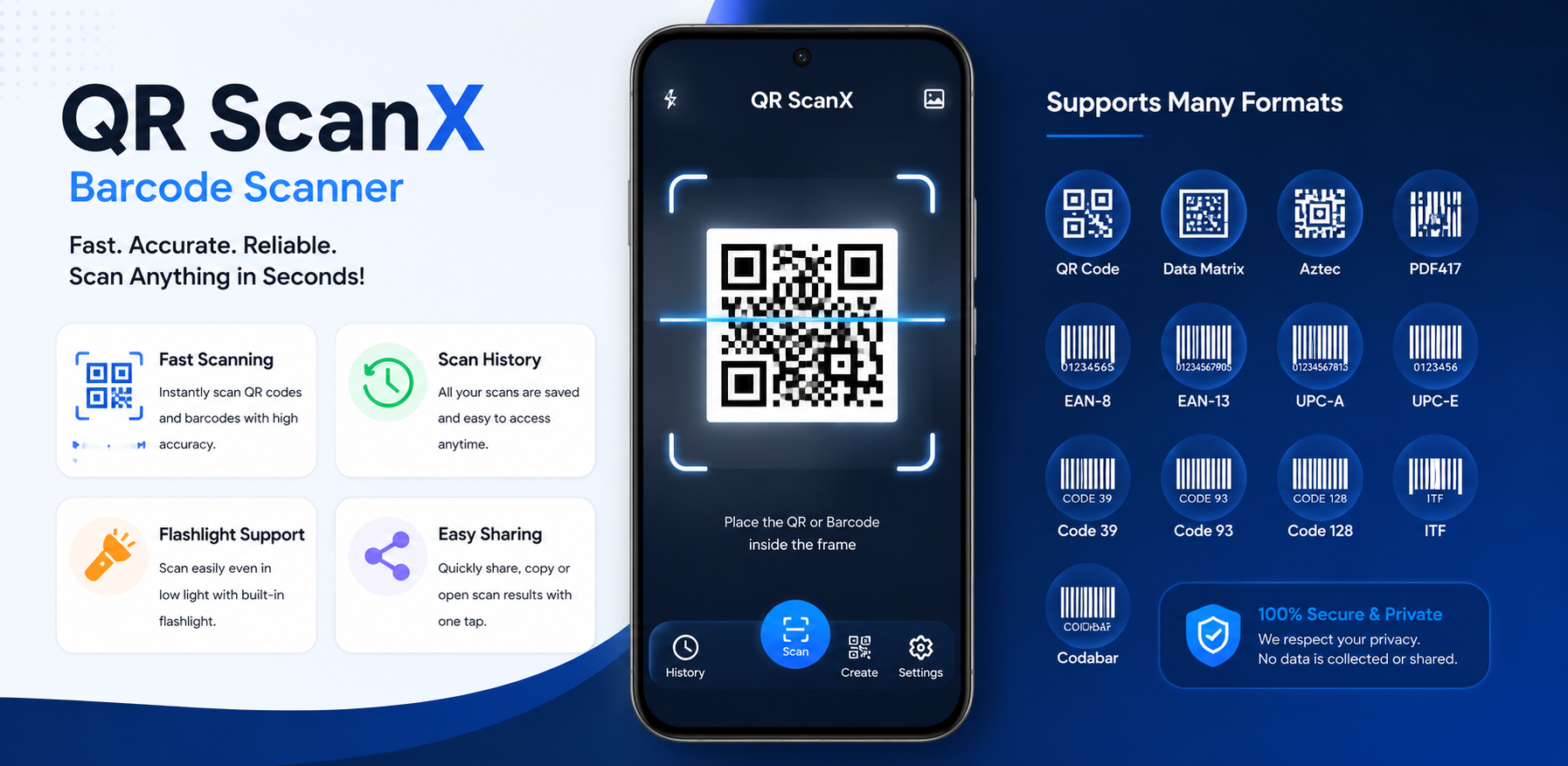
In a world where quick access to digital information is essential, having a reliable scanner on your smartphone is incredibly important. QR-ScanX is designed to provide Android users with a powerful, comprehensive utility for everyday scanning tasks. Whether you need to scan a restaurant menu, connect to a Wi-Fi network, or read a product barcode, QR-ScanX delivers a seamless experience.
This article dives into the core features of QR-ScanX, exploring how it serves as a complete QR code scanner and barcode reader for Android users. We'll explore the importance of keeping a reliable scanning tool on your device, how QR-ScanX organizes your scanned information, and why having granular control over your scanning settings makes everyday tasks faster and more efficient.
What Is QR-ScanX?
QR-ScanX is a versatile Android application that acts as your central hub for scanning digital codes. It is a modern Android QR code and barcode scanning application with scan history, search, filters, favorites, detailed scan results, image scanning, and customizable scanning settings. Built directly by GB Tech Studio with an emphasis on speed, reliability, and user privacy, QR-ScanX focuses on doing one thing exceptionally well: scanning and managing your codes.
The application is tailored for users who want more than just a basic QR code reader. By integrating a dedicated history tab, robust filtering options, and detailed scan results, QR-ScanX transforms your Android device into a professional-grade scanning companion. It operates flawlessly without unnecessary permissions, focusing entirely on delivering accurate scan interpretations and keeping your history organized for easy retrieval.
A Simple QR Code Scanner for Android
At its core, QR-ScanX is a lightning-fast QR code scanner designed for everyday convenience. From the moment you open the app, the scanner is ready to capture information.
The modern smartphone user scans multiple codes daily. From digital payment prompts to concert tickets, from digital business cards to public transit passes, QR codes are omnipresent. QR-ScanX aims to make interacting with these codes as frictionless as possible. The interface is clean, uncluttered, and prioritized entirely around the camera viewfinder, meaning you spend less time navigating menus and more time getting the information you need.
Scan QR Codes and Barcodes
The primary function of QR-ScanX is its camera-based scanning system. Utilizing your device's camera, the app provides a large scanning frame with clear visual guidance to help you properly align your codes. It effortlessly decodes standard QR codes, instantly translating them into actionable data such as website links, contact information, or plain text.
Additionally, QR-ScanX functions as a capable barcode scanner for Android. You can use it to read supported barcode formats on products, books, and packages, making it a handy tool for quick information retrieval while shopping or organizing. Instead of switching between dedicated QR readers and barcode scanners, you can trust QR-ScanX to handle both seamlessly from the same screen.
Scan QR Codes From Images
Not all QR codes are printed in the physical world. Sometimes you receive a QR code via email or take a screenshot of one on social media. Scanning these codes traditionally requires a second device—but not with QR-ScanX.
QR-ScanX natively supports scanning codes directly from saved images in your device's gallery, allowing you to easily process codes you cannot scan with your camera. When you need to scan a QR code from an image, simply tap the designated image icon in the app, select the screenshot or photo from your storage, and QR-ScanX will instantly extract the embedded data. This powerful feature eliminates the hassle of transferring images between devices just to read a simple link.
Scan QR Codes From Phones, Screens and Printed Materials
QR-ScanX is optimized to scan codes in a wide variety of environments. The scanner is highly capable of reading codes displayed brightly on computer monitors, tablets, and other mobile phones, overcoming issues with screen glare or pixelation.
Furthermore, it effortlessly handles scanning printed codes on everyday objects and documents—whether that's a glossy magazine page, a wrinkled flyer, or a matte product label. Its versatile reading capability ensures you aren't restricted by the medium.
Smart Scan History
One of the most frustrating aspects of basic scanner apps is losing a scanned link the moment you close the app. QR-ScanX solves this with a comprehensive scan history management system.
Every successful scan is automatically stored in the app's dedicated Scan History screen. This chronological log serves as a digital archive of your real-world interactions. If you scanned a restaurant menu last week and need to access it again to order takeout, or if you scanned a Wi-Fi configuration and need the password details, you can simply open your history rather than tracking down the physical code again.
Search Your Scan History
As your history grows, finding a specific scan from months ago might seem daunting. Fortunately, QR-ScanX includes integrated search functionality designed specifically for the Scan History screen.
By typing a keyword, domain name, or part of a text snippet into the search field, the app rapidly filters your chronological log to display only the relevant results. This makes your scan history highly actionable. You can search for previously scanned content with ease, ensuring that no piece of captured information is ever truly lost.
Filter Scan History by Type
To keep your history incredibly organized, QR-ScanX features powerful visual filtering options. You can instantly filter your past scans using exact categories built directly into the UI.
The available filters include:
- All: View your complete, unfiltered chronological scan history.
- Favorites: Isolate only the results you have marked as important.
- Web Links: Filter your history to display only scanned URLs and websites.
- WiFi Configuration: Quickly find previously scanned network credentials.
- Plain Text: View scans that contained standard text messages or notes.
- Other Formats: See all other supported scanned data types.
These specialized tabs ensure you can always find exactly what you are looking for in seconds, without having to scroll endlessly through hundreds of unrelated entries.
Save Important Results With Favorites
For scan results you access frequently, QR-ScanX allows you to mark them as Favorites. Favorited items are highlighted in the UI and can be easily isolated using the history filters.
This feature is perfect for archiving important web links, permanent Wi-Fi network configurations for your home or office, or frequently accessed text snippets. By utilizing the Favorites system, you can treat QR-ScanX as a personalized bookmark manager for physical-world codes, keeping your most critical scans just a tap away.
Detailed Scan Result Screen
When you scan a code, QR-ScanX doesn't just blindly execute a command; it presents the data in a detailed scan result screen so you can review the information carefully before taking action.
This deliberate design choice gives you full control over how you interact with scanned data. Instead of automatically opening a potentially unwanted website, the app pauses to let you inspect the payload. The interface cleanly presents the raw Scanned Data, ensuring you know precisely what the code contains before you decide to process it further.
Open, Copy and Share Scanned Information
The result screen provides immediate, highly useful actions tailored for your scanned data. The interface clearly provides options to:
- Open the link in your device's browser or relevant default application.
- Copy the raw text directly to your device clipboard for pasting elsewhere.
- Share the result with other apps, such as messaging platforms or email clients, using the native Android share sheet.
- Favorite the item to save it permanently in your dedicated Favorites tab.
Website URL Recognition
For recognized website URLs, the app intelligently parses the data to show you exactly where the link leads. QR-ScanX can easily recognize website URLs from scanned QR codes.
The interface clearly breaks down the Scanned Data into readable components. It explicitly displays the Domain and the Protocol, giving you a clear, structured view of the URL. This transparency is incredibly helpful when dealing with long, complex links or shortened URLs, so you know exactly what to expect before tapping "Open".
Domain, HTTPS and Security Information
When a scanned result points to an HTTPS website, the interface highlights this by showing the HTTPS protocol and a Secure status indicator.
While this is simply informational—and does not guarantee a website's overall safety against phishing or malicious content—it is a very helpful visual cue that the link utilizes standard web encryption. This added layer of transparency is part of QR-ScanX's commitment to giving you as much context as possible before you interact with external web content.
Duplicate Scan Protection
Every user interacts with their device differently, which is why QR-ScanX offers a highly customizable Settings menu to tailor the scanning behavior to your personal preferences.
To prevent the app from capturing the same code multiple times in rapid succession, the Duplicate Scan Protection setting is available. This clever feature instructs the scanner to "Ignore duplicate scanned contents within 2000ms". If your hand shakes or you hover over a code too long, your scan history won't be cluttered with identical, consecutive entries.
Scan Laser Animation
For enhanced visual feedback, you can toggle the Scan Laser Animation from the Settings menu. Enabling this will "Display sweeping laser line inside scanner frame" while the camera searches for a code.
This familiar animation provides excellent visual confirmation that the scanner is actively analyzing the camera feed, making the overall scanning experience feel more responsive and dynamic.
Beep Confirmation and Haptic Feedback
Auditory and physical feedback can be crucial, especially when scanning codes in loud environments or when looking away from the screen. The app allows you to enable a Beep Confirmation to "Play sound when scan is successful".
Additionally, you can toggle Haptic Vibration for a "Short pulse vibration on scan finish". Combining both options ensures you never miss a successful scan, providing a tactile and audible acknowledgment the moment the data is captured.
Auto Clipboard Copy and Auto Flash
For maximum efficiency, power users can enable the Auto Clipboard Copy feature. When toggled on, the app will "Copy parsed texts automatically to device clipboard" upon scanning, completely bypassing the need to tap "Copy" manually. This is a massive time-saver for repetitive data entry tasks.
Furthermore, the Auto Flash setting will "Enable camera flash automatically when scanning opens". This is the perfect setting for users who frequently scan codes in dark environments, such as dimly lit restaurants or warehouses, ensuring the camera always has enough light to focus instantly.
Customizable Scanning Experience
QR-ScanX includes support for an App Theme Mode directly within the Settings UI, showing the current theme status. This allows the interface to seamlessly adapt to your device preferences, ensuring the app remains visually comfortable to use whether you prefer dark mode at night or light mode during the day.
Privacy, Legal and Support Options
QR-ScanX respects your device and your data. We believe that a utility app should remain a utility—not a data collection tool. The Settings UI provides direct, transparent access to our Privacy Policy, Terms & Conditions, and Open Source Licenses.
If you ever need assistance, the support section offers quick, integrated links to:
- Rate App Store Experience: Leave feedback directly on the Google Play Store.
- Share QR ScanX App: Easily recommend the app to friends or colleagues.
- Contact Support: Reach out to our team directly for help.
- Report a Bug: Send technical details if you encounter any issues.
Why Use QR-ScanX?
QR-ScanX for Everyday Android Users
Whether you are scanning a Wi-Fi code at a local cafe, or reading a package barcode to check product details, QR-ScanX provides all the essential tools you need in a single, lightweight application.
Its deep focus on organization through history filters and favorites elevates it from a basic, single-use utility to a true digital management tool. Instead of discarding scanned data, QR-ScanX helps you build a searchable archive of your interactions.
Final Thoughts
QR-ScanX is dedicated to providing a high-quality, reliable, and privacy-focused scanning experience. With its smart scan history management, detailed and actionable result screens, and extensive customization options including haptic feedback and auto-flash, it stands as the complete QR code and barcode utility for your Android device.
Experience the convenience of having an all-in-one scanner right in your pocket. Manage your scans better and retrieve information faster with ease using QR-ScanX.