 Speed Go
• June 04, 2026
Speed Go
• June 04, 2026
Speed Go: Real-Time Internet Speed Monitor for Android
1. Introduction
Have you ever wondered exactly how fast your internet is downloading a large file in the background, or if a video stream is quietly buffering while using another app? Speed Go was designed specifically to provide continuous, at-a-glance network speed monitoring directly from your Android status bar and notification area, ensuring you always know how much data is moving through your connection without interrupting your workflow.
2. What Is Speed Go?
Speed Go is a lightweight Android internet speed monitor that provides immediate visibility into your device's actual network activity. Built with simplicity in mind, it quietly monitors data flow and presents it in a clear, unobtrusive format. Whether you are troubleshooting a slow connection, keeping an eye on an important upload, or monitoring daily data usage, Speed Go makes your network activity visible.
3. Monitor Download and Upload Speed in Real Time
Unlike conventional internet speed tests that flood your connection with artificial test data, Speed Go measures the actual, real-time download and upload speed of your current active applications. You can see your network activity dynamically update while using other apps, streaming movies, or downloading files.
4. See Network Speed Directly in the Status Bar
The primary feature of Speed Go is its seamless integration into the Android interface. Your real-time network speed is displayed directly in the Android status bar and notification area. This allows you to monitor downloads, observe cloud uploads, and detect background app data activity without opening a separate app.
5. Choose How Speed Is Displayed
Customization is key to a comfortable monitoring experience. Speed Go offers three straightforward Display Mode options:
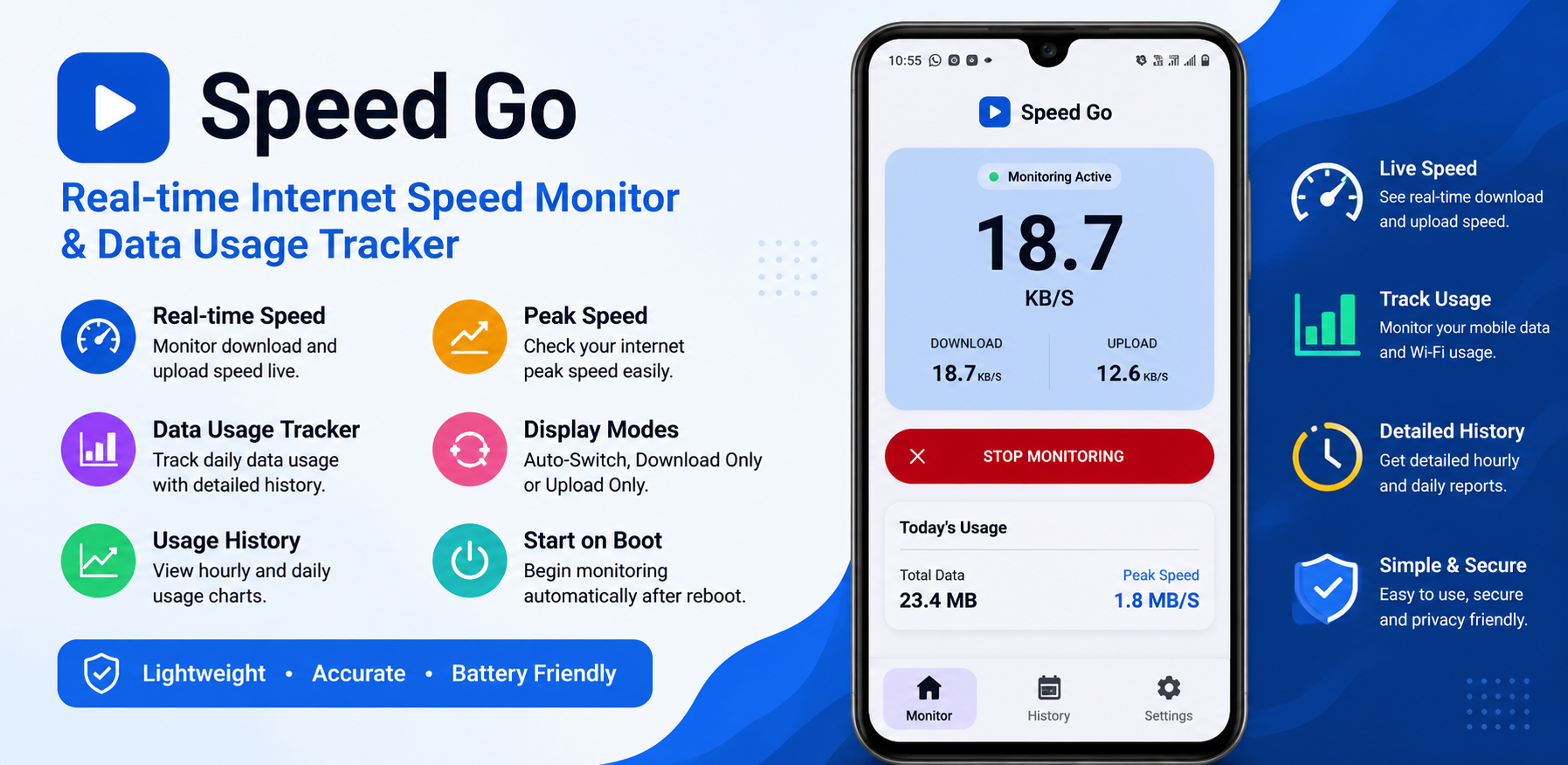
- Auto-Switch: Intelligently switches the status bar display to show whichever metric (download or upload) is currently more active.
- Download Only: Locks the status bar display to focus exclusively on incoming data speed.
- Upload Only: Locks the status bar display to focus solely on outgoing data speed.
6. Track Daily Data Usage
Beyond live speeds, Speed Go keeps track of your daily network usage. The app clearly presents your total data usage for the day, neatly broken down into download usage and upload usage, as well as recording the peak speed achieved during the day.
7. Review Network Usage History
To provide broader context, Speed Go features a dedicated History screen. This chronological log organizes your network activity by date, allowing you to review previous days and see total transferred data, download data, upload data, and peak speed reached.
8. Start Monitoring Automatically After Reboot
For users who want continuous visibility, the Start on Boot setting ensures that Speed Go automatically resumes monitoring your network speed immediately after you restart your Android device.
9. Battery Optimization Guidance
Because Speed Go continuously monitors network traffic to update the status bar, it runs efficiently in the background. Speed Go includes helpful built-in battery optimization guidance to help users configure their device settings for uninterrupted background monitoring.
10. Simple Monitor, History and Settings Interface
Speed Go features a clean, tabbed layout divided into three main areas:
- Monitor: The main screen to start or stop the service and view live speeds and today's usage.
- History: The chronological log of daily data consumption and peak speeds.
- Settings: Straightforward configuration options to adjust display modes, boot behavior, and access support options.
11. Practical Everyday Use Cases
- Monitoring Large Downloads: Watch exact file transfer rates without opening download managers.
- Tracking Background Uploads: Ensure video or photo backups are actively transferring to the cloud.
- Troubleshooting Network Stalls: Instantly check whether an app has lost connection or is actively receiving data.
- Data Usage Awareness: Stay within mobile data caps by monitoring daily consumption.
12. Speed Go vs Traditional Internet Speed Tests
It is important to understand the difference between an Android network speed monitor like Speed Go and traditional speed test services:
Traditional Speed Tests: Run temporary, high-intensity tests when explicitly triggered by downloading artificial test data to measure maximum theoretical connection bandwidth.
Speed Go: Continuously monitors actual ongoing network traffic generated by your active apps, keeping speed visible in the status bar and logging daily usage over time.
13. Privacy-Focused Network Monitoring
Speed Go respects your privacy by analyzing only the volume of data moving through your network interface locally on your device. For complete transparency, review the official Speed Go Privacy Policy.
14. Key Features at a Glance
- Real-time download speed monitoring
- Real-time upload speed monitoring
- Status-bar speed monitoring
- Notification-area speed indicator
- Auto-Switch display mode
- Download-only & Upload-only display modes
- Daily data usage tracking
- Download/upload usage history
- Peak speed tracking
- Start on Boot setting
- Battery optimization guidance
- Simple Monitor, History, and Settings interface
15. Conclusion
Speed Go provides continuous, real-time visibility into your Android device's network activity directly in your status bar. Download Speed Go today on Google Play and explore our full ecosystem in the GB Tech Studio Apps Catalog.